automate PingFederate SSO using Requests

Overview
Headless login to PingFederate SSO using requests and BeautifulSoup.
Review SAML 2.0 flow
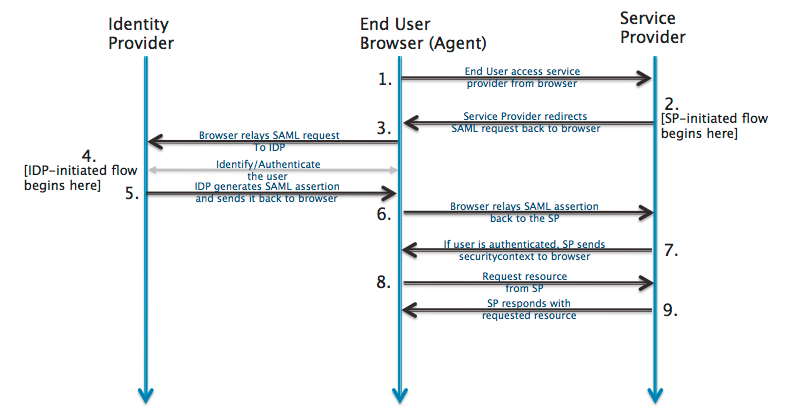
Begin with the start SSO endpoint
/idp/startSSO.ping?PartnerSpId=XXXXX
in this example, I'll use mytlc.bestbuy.com.
Use Requests to get the page response
Tip: Use Chrome's developer tools to analyze the network traffic in a "manual" session, request-by-request.
The flow is initiated by sending a GET request to the first link.
import requests
import pprint

from bs4 import BeautifulSoup
url = 'https://mytlc.bestbuy.com'
username = 'my_username'
password = 'my_password'

r = requests.get(url)
Navigating to this page first will take you through several pages to land at the sp endpoint sp/startSSO.ping. Once you initiate the startSSO.ping flow, you must manually pass the SAML request tokens and specify allow_redirects=False.
Read the response with BeautifulSoup
soup = BeautifulSoup(r.text, 'html.parser')
saml_request = soup.find(
    'input', {
        'name': 'SAMLRequest',
        'type': 'hidden'
    }).get('value')
saml_relay = soup.find(
    'input', {
        'name': 'RelayState', 'type': 'hidden'
    }
).get('value')
saml_url = soup.find('form', {'method': 'post'}).get('action')
r = s.post(saml_url, params=payload, allow_redirects=False)
<input name="SAMLRequest" type="hidden" value="foo">
<input name="RelayState" type="hidden" value="bar">
I will use the above HTML example. In the Python code, line 3 will find the first HTML string and return foo as saml_request. Line 8 will find the second HTML string and return bar as saml_relay. The value of saml_url should be the /idp/SSO.saml2 endpoint.
Find POST payload for sending credentials
This should take you to the authentication page where you enter your organization credentials. These are most likely different for each PF application, so it's easier to demonstrate how to find them than to provide exact values. Log into the site normally and capture the network traffic with the dev tools, look for a POST request to the SSO.ping endpoint.
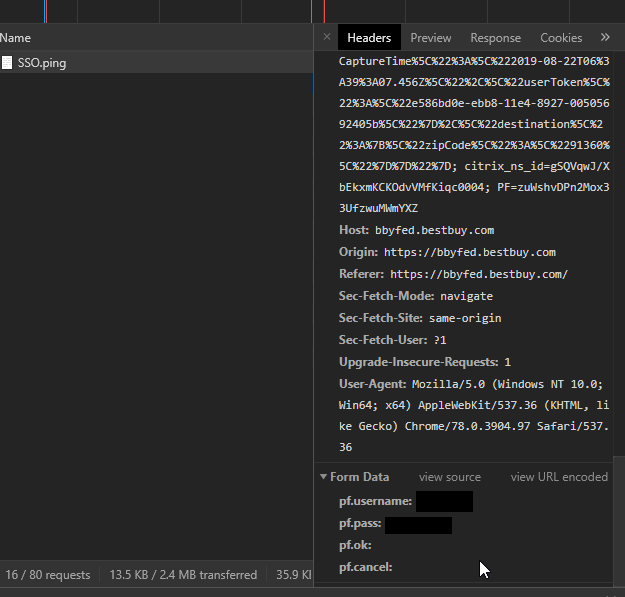
payload = {
    'pf.username': username,
    'pf.pass': password,
    'pf.ok': 'clicked',
    'pf.cancel': ''
}
Construct the PingFederate cookies
PingFederate uses the combination of the PF cookie and the nonce inserted into the resume path as the index to the state table.
This nonce, the second component of the URL path, is randomly generated before the redirect response sends the browser to the authentication service. For example, in /idp/l1qWE/resumeSAML20/idp/SSO.ping, l1qWE is a random nonce.
This can be found in the HTML:
<form class="form-horizontal" method="POST" action="/idp/l1qWE/resumeSAML20/idp/SSO.ping"
                    autocomplete="off">`
Parse the exact value with BeautifulSoup:
soup = BeautifulSoup(r.text, 'html.parser')
base_url = r.url.replace(r.request.path_url, '')
nonce = soup.find(
    'form', {
        'class': 'form-horizontal',
        'method': 'POST', 'autocomplete': 'off'
    }).get('action')
nonce_url = base_url + nonce
r = s.post(nonce_url, data=payload, allow_redirects=False)
This should return the baseurl + the value in the action field.
Post the SAMLResponse token to ACS.saml2
soup = BeautifulSoup(r.text, 'html.parser')
acs_url = soup.find(
    'form', {
        'method': 'post',
    }).get('action')
saml_response = soup.find(
        'input', {
            'name': 'SAMLResponse'
        }).get('value')
payload = {
    'SAMLResponse': saml_response,
    'RelayState': saml_relay
}
r = s.post(acs_url, data=payload)
Review
Here's what the entire flow should look like from start to finish. I added print r.url line before and after each request.
> python -i saml.py
get https://mytlc.bestbuy.com
- post https://bbyfed.bestbuy.com/idp/SSO.saml2
- the value of r.url = https://bbyfed.bestbuy.com/idp/SSO.saml2?SAMLRequest=PHNhbWxwOkF1dGhuUmVxdWVzdCBWZXJzaW9uPSIyLjAiIElEPSJGazM2UW5vMmZOUTA5ZUhxejNPdEJGSVZYSVgiIElzc3VlSW5zdGFudD0iMjAxOS0xMS0xMlQwNzowNjo1Mi40MDVaIiB4bWxuczpzYW1scD0idXJuOm9hc2lzOm5hbWVzOnRjOlNBTUw6Mi4wOnByb3RvY29sIj48c2FtbDpJc3N1ZXIgeG1sbnM6c2FtbD0idXJuOm9hc2lzOm5hbWVzOnRjOlNBTUw6Mi4wOmFzc2VydGlvbiI%2BVExDYmV0YV9TUDwvc2FtbDpJc3N1ZXI%2BPHNhbWxwOk5hbWVJRFBvbGljeSBBbGxvd0NyZWF0ZT0idHJ1ZSIvPjwvc2FtbHA6QXV0aG5SZXF1ZXN0Pg%3D%3D&RelayState=orHhZ9xrYkYo8jG71NgVhBxH6xUPfa
- post https://bbyfed.bestbuy.com/idp/7gBAU/resumeSAML20/idp/SSO.ping
- the value of r.url = https://bbyfed.bestbuy.com/idp/7gBAU/resumeSAML20/idp/SSO.ping
- post https://bbyfed.bestbuy.com/sp/ACS.saml2
- the value of r.url = https://mytlc.bestbuy.com/mobility/app/Index.html