Neovim Experience on Windows

This is to collect my experience working with Neovim on Windows, from performance to workflow.
It's worth nothing that performance on Windows is NOT inherently worse, from my experience. It's that anti-virus and privilege escalation software such as Windows Defender and BeyondTrust EPM seem to embellish speed issues from file-driven architecture of Neovim and other CLI tools. As noted by several Reddit users, it appears that corporate security software affects Windows and MacOS evenly, even on newer Apple Silicon models.
Performance Improvements
Set locale manually
When analyzing startuptime via --startuptime, I noticed locale set was taking 60ms.
1 000.009 000.009: --- NVIM STARTING ---
2 000.092 000.083: event init
3 000.308 000.216: early init
4 068.528 068.221: locale set
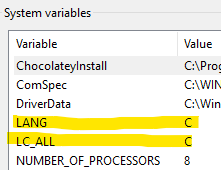
Windows setlocale() pulls from system locale data, which involves registry access and slow Windows internals. I reduced this to 0.05ms by manually adding the environment variables (system vs. user environment didn't make a difference).
setx LANG C /M
setx LC_ALL C /M
1 000.011 000.011: --- NVIM STARTING ---
2 000.083 000.072: event init
3 000.287 000.204: early init
4 000.325 000.038: locale set
Use osc52 clipboard
I believe it is important not to override Vim's native yank functionality as a lot of an effective workflow involves managing buffers correctly in addition to the clipboard buffer. However, occasionally you just need to copy and paste some text. Every single clipboard guide I found resulted in poor performance for the initial copy. I tried several methods including using native Powershell Get-Clipboard and win32yank.exe. Enter OSC52.
OSC52 is an ANSI escape sequence that allows you to copy text into your system clipboard from anywhere, including from remote SSH sessions.
There are much larger implications here such as copying over SSH sessions, which is also another great reason to use this plugin. However, my main reason for bringing this in is that it has a massive performance improvement on Windows. It doesn't spawn any additional processes, reducing my initial copy time by about 5 seconds in many cases. To set it up, simply install the plugin and add an autocmd:
return {
  -- for fast clipboard
  'ojroques/nvim-osc52',
  event = "TextYankPost",
  config = function()
    require('osc52').setup()
    require("osc52").copy_register("")
    vim.api.nvim_create_autocmd("TextYankPost", {
    callback = function()
      if vim.v.event.operator == "y" and vim.v.event.regname == "+" then
    require("osc52").copy_register("+")
      end
    end,
    })
  end,
}
Resolve PATH-related issues
A lot of performance issues seem to be related to Windows having poor performance when searching for files. There are likely many reasons for this, but I've seen several articles that point to a major culprit being the PATH environment variable. Most Windows installations do not make use of a central binary location such as /usr/local/bin, and instead will add program directories straight to the PATH environment variable. A fix suggested for WSL is to explicitly define your rtp rather than to use the polluted Windows version. The fix here is to specify the python provider explicitly, to speed up the search. Per Sandwich-Resident on Reddit:
One way to speed up startup time is by telling Neovim directly which Python executable to use:
let g:python3_host_prog = expand('~/path/to/venv/with/pynvim/bin/python')
That way, Neovim doesn't have to make expensive calls to the OS trying to figure it out itself (any calls to system() or executable() is a performance killer).
Improve your Powershell startup time
Optimizing Your Profile This could be a separate page and is not directly related to Neovim. However, switching from Powershell 5 to Powershell 7.x halved my shell startup time, which further reduces the startup time to launching Neovim as well.
Per StackOverflow, use RunSpaces to make module imports lazily loaded.
Enable Windows Defender exclusions
As noted by Reddit, adding the nvim.exe binary to the Windows Defender exclusions seems to have varied results. This could also be applied to pwsh.exe as well.
Performance Issues
executable() is slow While this article points to WSL, this has slow Windows performance as well. This is not currently resolved at the time of writing.
Why not use WSL?
WSL has its uses and many performance issues completely disappear when using WSL. However, it's not compatible with my workflow at the time of writing.
No Windows Integrated Authentication support.
CLI tools that rely on Integrated Authentication, such as ActiveDirectory modules, are not supported natively / securely.
Poor integration with the Windows file system
From WSL#File Systems:
We recommend against working across operating systems with your files, unless you have a specific reason for doing so. For the fastest performance speed, store your files in the WSL file system if you are working in a Linux command line (Ubuntu, OpenSUSE, etc). If you're working in a Windows command line (PowerShell, Command Prompt), store your files in the Windows file system.
Overall Cons
- No tmux. This is kind of a big downside, and I'm not convinced that the alternative workaround is to pivot all of the existing tmux functionality to Neovim. There are some things that are handled much more effectively in a separate console window. Windows Terminal does have simple pane functionality which can be bound and navigated. The lack of a leader key does create the opportunity to have conflicting keybinds if you are not careful.
Unexplored Alternatives
VSCode with WSL Neovim
I have not looked into this much because VSCode is already slow to respond. This reminds me of how electric vehicles are more sensitive to noise - the ride is quieter, so more noise is noticed. In the same vein, I don't really care that much for performance increases when the entire program takes several seconds to load already.